Configure VRCObjectPool
What is VRCObjectPool?
VRCObjectPool is a component provided by the VRChat SDK. It manages an array of GameObjects and synchronizes their visibility between players.
The owner of the Pool can show or hide registered GameObjects. Players who join the world later also receive the current visibility state of each object.
Object Spawn System uses this functionality to manage the visibility of spawn targets.
Complete Prepare a Pickup for spawning first and prepare the spawn target GameObjects.
1. Prepare the required number of GameObjects
Add as many Pickup GameObjects to the scene as you want to be able to display simultaneously.
For example, to display up to five copies of the same dish, prepare five Pickups with the same settings.
2. Add VRCObjectPool
- Add an empty GameObject to the Hierarchy
- Add the
VRCObjectPoolcomponent to the GameObject - Give the GameObject a descriptive name
3. Register spawn targets
Register the prepared GameObjects in the Pool array of the new VRCObjectPool.
You can register multiple objects at once by locking the Inspector with VRCObjectPool visible, selecting several GameObjects in the Hierarchy, and dragging them onto Pool.
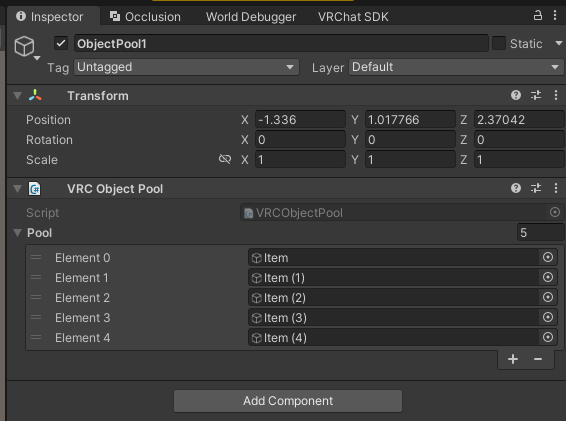
In the standard version of Object Spawn System, the GameObject registered in VRCObjectPool must be the same GameObject that contains VRCPickup and the Collider used for Return detection.
4. Behavior after registration
You do not need to manually disable GameObjects registered in the Pool array. GameObjects registered in VRCObjectPool are automatically hidden when the world starts.
If every GameObject is currently visible, using the Spawn switch will not display another GameObject.
5. Organize the Hierarchy
Keeping Pickups of the same type together with their VRCObjectPool makes the registered contents easier to inspect.
FoodPool
├─ FoodItem_01
├─ FoodItem_02
├─ FoodItem_03
├─ FoodItem_04
└─ FoodItem_05
Add VRCObjectPool to FoodPool, then register each FoodItem_xx in its Pool array.

When preparation is complete, continue to Create a Spawn switch.