Prepare a Pickup for spawning
Object Spawn System is primarily intended for spawn targets that contain VRCPickup.
This page explains how to adapt an existing Pickup in your world for use with Object Spawn System.
Required components
Confirm that the spawn target GameObject has the following components.
| Component | Purpose |
|---|---|
VRCPickup | Allows players to hold the object |
Rigidbody | Controls the physical behavior of the Pickup |
Collider | Detects collisions between the Pickup and Return trigger |
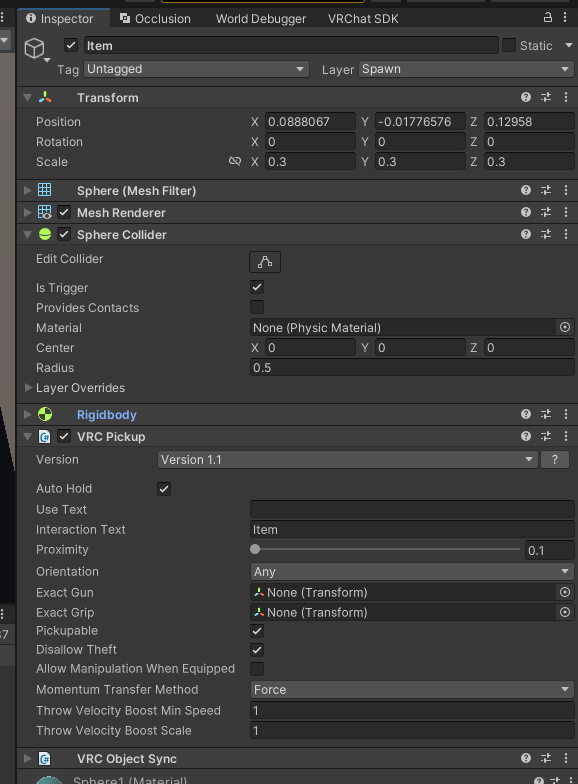
If position and rotation need to be synchronized between players, use an appropriate synchronization component for your use case. VRCObjectSync is one option, but it is not required for Object Spawn System to operate.
1. Check the target GameObject
In the Hierarchy, select the Pickup that you want Object Spawn System to spawn.
In the standard version, the following must all be the same GameObject.
- The GameObject registered in
VRCObjectPool - The GameObject containing
VRCPickup - The GameObject containing the Collider that enters the Return trigger
If VRCPickup or the Collider used for Return detection is on a child GameObject, consider using the Object Spawn Extension.
2. Configure a dedicated layer
We recommend creating a dedicated layer for objects returned by Object Spawn System.
- Add a new layer in Unity's Layer settings
- Assign the new layer to the GameObject that is both a spawn target and a Pickup
- Assign the same layer to child GameObjects as needed. However, in the standard version, the Collider used for Return detection must be on the same GameObject that is registered in
VRCObjectPool - Set the
Layerfield of theReturnObjectcreated later to the same layer number
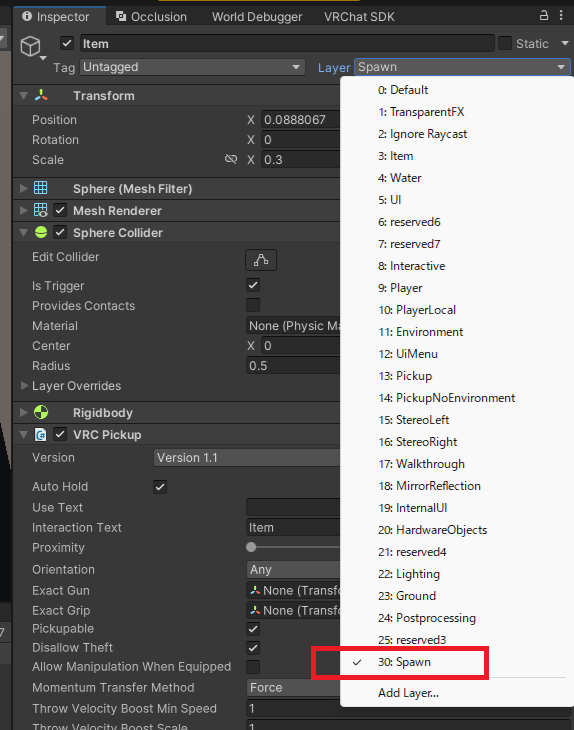
Layer valuesSet the Pickup GameObject and ReturnObject to the same layer number.
If the numbers do not match, placing the Pickup in the Return trigger will not hide it.
When preparation is complete, continue to Configure VRCObjectPool and register the GameObject in the Pool array.