Migrate from Object Spawn System
Use the included editor migration tool to replace Object Spawn System components and settings in the current scene with their Extension versions.
Before migration
- Back up the Unity project
- Import the Object Spawn Extension unitypackage
- Open the scene to migrate
- Save the scene
The migration tool creates added- and removed-component overrides on Prefab instances in the scene. It does not modify Prefab Assets in the Project window.
The migration tool cannot run in Prefab Mode. Open the scene containing the migration targets before running it.
Open the migration tool
Select the following item from the Unity menu.
Tools > Purabe Works > Object Spawn Extension
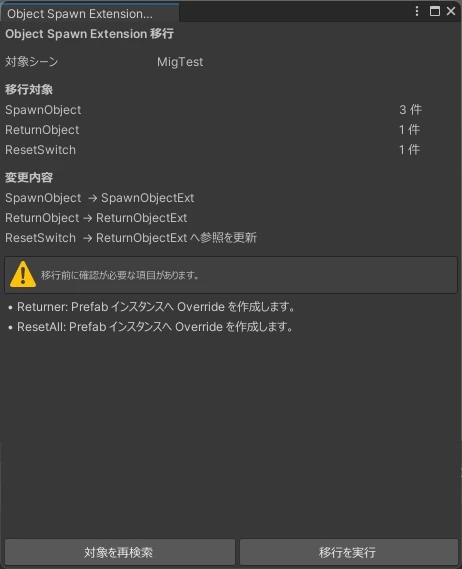
The tool searches the active scene for the following components. Inactive GameObjects are also included.
SpawnObjectReturnObjectResetSwitch
Automatically migrated content
| Before migration | After migration |
|---|---|
SpawnObject | SpawnObjectExt |
ReturnObject | ReturnObjectExt |
ResetSwitch | The component is retained and its reference is changed to the migrated ReturnObjectExt |
The following settings are transferred to the new components.
VRC Object PoolRandom SpawnMove Item To HandSpawn PointSpawn Delay FramesPools,Reference, andLayer- Audio sources and clips for Spawn and Return
Run the migration
- Check the number of targets displayed in the window
- Review any warnings
- Select
移行を実行(Run migration) - Review the migrated counts and warnings on the completion screen
- Check the Inspector references and test the behavior in the world
- If everything works, save the scene
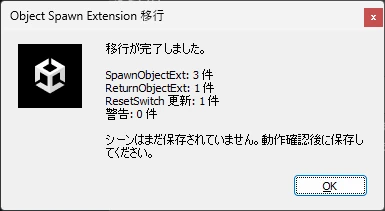
You can undo the migration with Unity's Undo command. The scene is not saved automatically.
Settings to configure after migration
- The existing
Spawn Pointis retained as a single spawn destination. To use multiple points, change the destination mode onSpawnObjectExtto複数(Multiple). - Spawn and Return event notifications are created disabled. Enable them only on the components that need them.
CompSpawnHelperandHGSpawnHelperare not added automatically. Configure them for each complex item as needed.
When migration is skipped
If the same GameObject already contains the destination SpawnObjectExt or ReturnObjectExt, the tool does not merge them automatically and skips that component.
If any migration target remains, review the warning and configure it manually.