Configure a complex Pickup
CompSpawnHelper allows an item whose VRCPickup or Return-detection Collider is on a child GameObject to be spawned and returned by its root.
Example structure
ComplexItemRoot
├─ PickupObject
│  ├─ VRCPickup
│  ├─ Rigidbody
│  └─ Collider
└─ Other child GameObjects
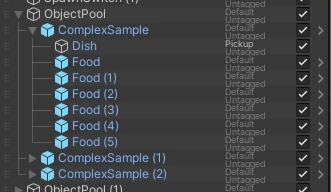
In this example, register ComplexItemRoot in VRCObjectPool and add CompSpawnHelper to the same GameObject.
1. Configure the root registered in the Pool
- Prepare a root GameObject that contains the entire item
- Add
CompSpawnHelperto the root - In
Return Base Go, assign the child GameObject that enters the Return trigger - Register the root GameObject in the
Poolarray ofVRCObjectPool
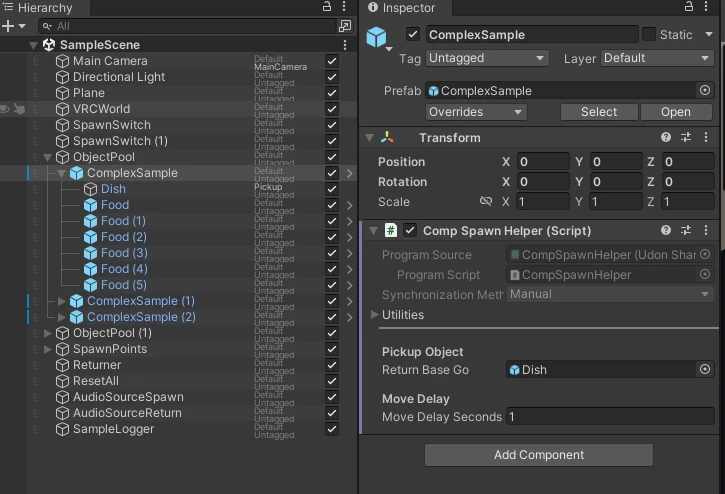
Return Base GoThe parent root GameObject that contains the entire item is registered in VRCObjectPool and contains CompSpawnHelper.
Assign the Pickup-side child GameObject that enters the Return trigger to Return Base Go. This GameObject moves to the destination after Spawn and has its position and rotation reset after Return.
SpawnObjectExt obtains CompSpawnHelper from the spawned root GameObject. Add CompSpawnHelper to the same GameObject registered in VRCObjectPool.
2. Configure the Pickup and layer
- Add
VRCPickup,Rigidbody, and a Collider to the child GameObject - Assign the Object Spawn Extension dedicated layer to the GameObject containing the Collider used for Return detection
- Set
LayeronReturnObjectExtto the same layer number - Ensure that
PoolsonReturnObjectExtcan reference theVRCObjectPoolcontaining the root
When the child Pickup enters the Return trigger, ReturnObjectExt searches its parents for CompSpawnHelper and hides the root GameObject containing that helper.
3. Check the movement method
If Return Base Go contains VRCObjectSync, the helper uses synchronized movement and Respawn. Without VRCObjectSync, it saves the position and rotation at world startup and restores that Transform on Return.
Move Delay is the number of seconds to wait between spawning and moving the helper target. Normally use the default value, and increase it gradually if movement is not applied correctly.
Return Base Go is also a search target for SpawnOffset or an ObonEasy TrayItem component. To adjust the spawn position and orientation, see Adjust position and rotation when spawning.
Test the behavior
- Spawn the item with
SpawnObjectExt - Confirm that the child GameObject assigned to
Return Base Gomoves to the specified spawn point - Place the child Pickup in the Return trigger
- Confirm that the Pickup is dropped and the entire root registered in the Pool becomes hidden
- Spawn it again and confirm that it can be used in its initial state