Configure VRCObjectPool
What is VRCObjectPool?
VRCObjectPool is a component provided by the VRChat SDK. It manages an array of GameObjects and synchronizes their visible state between players.
Object Spawn Extension uses this mechanism to display and hide spawn targets.
1. Prepare enough GameObjects
Add as many Pickup GameObjects to the scene as the maximum number that may be visible at the same time.
For example, to display up to five copies of the same dish, prepare five Pickups with the same settings.
2. Add VRCObjectPool
- Add an empty GameObject to the Hierarchy
- Add the
VRCObjectPoolcomponent to it - Give the GameObject a descriptive name
3. Register spawn targets
Register the prepared GameObjects in the Pool array of VRCObjectPool.
To register several GameObjects at once, lock the Inspector with the lock icon while displaying VRCObjectPool, select multiple GameObjects in the Hierarchy, then drag them into Pool.
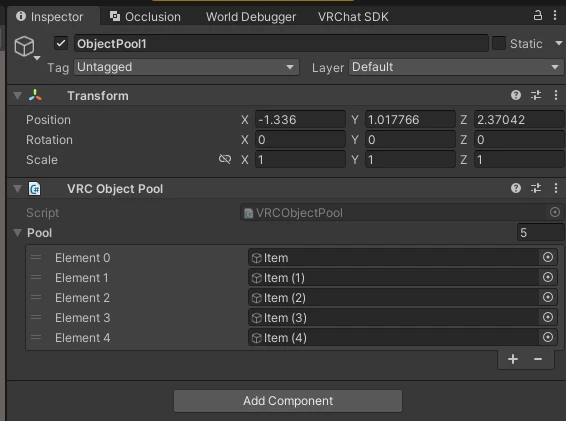
For a simple Pickup structure, use the same GameObject for the VRCObjectPool entry, VRCPickup, and the Collider used for Return detection.
When the Pickup is on a child GameObject, configure CompSpawnHelper or HGSpawnHelper, then register the root of the entire item. See Configure a complex Pickup or Configure an item made by henoGohan for helper setup.
4. Behavior after registration
You do not need to disable the registered GameObjects manually in Unity. GameObjects registered in VRCObjectPool are hidden automatically when the world starts.
If every GameObject is already visible, operating the Spawn switch will not display another one.
5. Organize the Hierarchy
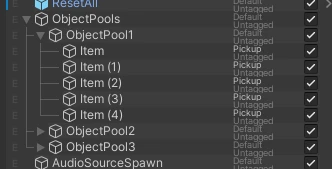
Organizing Pools and spawn targets by purpose is recommended.
ObjectSpawnPools
└─ FoodPool
   ├─ FoodItem_01
   ├─ FoodItem_02
   └─ FoodItem_03
Add VRCObjectPool to FoodPool, then register each item's GameObject in its Pool array. If a Pickup is on a child GameObject, register the root GameObject of the entire item.
Continue to Create a Spawn switch with SpawnObjectExt.