Prepare a Pickup for spawning
Object Spawn Extension is primarily intended for spawn targets that contain VRCPickup.
Begin with a simple Pickup where VRCPickup and the Collider used for Return detection are on the same GameObject. After confirming the basic behavior, see Configure a complex Pickup if the Pickup is on a child GameObject.
Required components
Confirm that the spawn target GameObject contains the following components.
| Component | Purpose |
|---|---|
VRCPickup | Allows a player to hold the object |
Rigidbody | Controls the Pickup's physics behavior |
Collider | Detects collisions with the Return trigger |
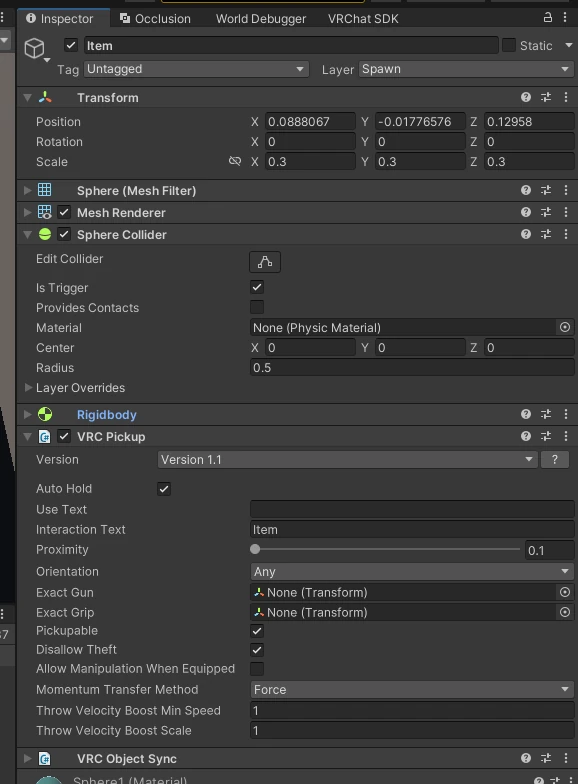
To synchronize position, rotation, or other state between players, also use a synchronization component appropriate for the item. VRCObjectSync is one option, but it is not required for the basic operation of Object Spawn Extension.
1. Identify the target GameObject
In the Hierarchy, select the Pickup you want to display through Object Spawn Extension.
For the initial setup, use the same GameObject for all of the following.
- The GameObject registered in
VRCObjectPool - The GameObject containing
VRCPickup - The GameObject containing the Collider that enters the Return trigger
2. Configure a dedicated layer
Using a layer dedicated to Object Spawn Extension Return targets is recommended.
- Add a new layer in Unity's Layer settings
- Assign the new layer to the GameObject that is both the spawn target and the Pickup
- Later, set
LayeronReturnObjectExtto the same layer number
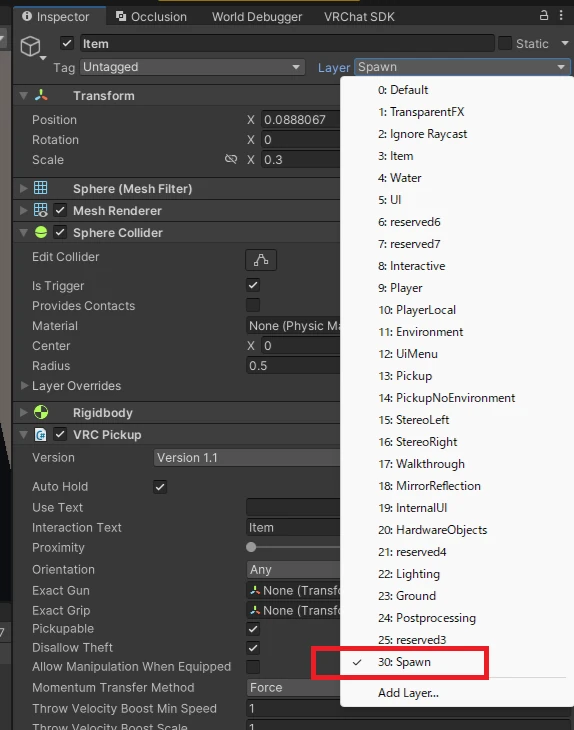
Layer valuesUse the same layer number on the Pickup GameObject and in Layer on ReturnObjectExt.
If the numbers do not match, placing the Pickup in the Return trigger will not hide it.
Continue to Configure VRCObjectPool.